
Convert More Leads – Things to Help You Close the Job
LeadBlast.ai is recommending you to your prospects seeking your service. What now?
- You don’t NEED to do anything further beyond what LeadBlast.ai is already doing for you.
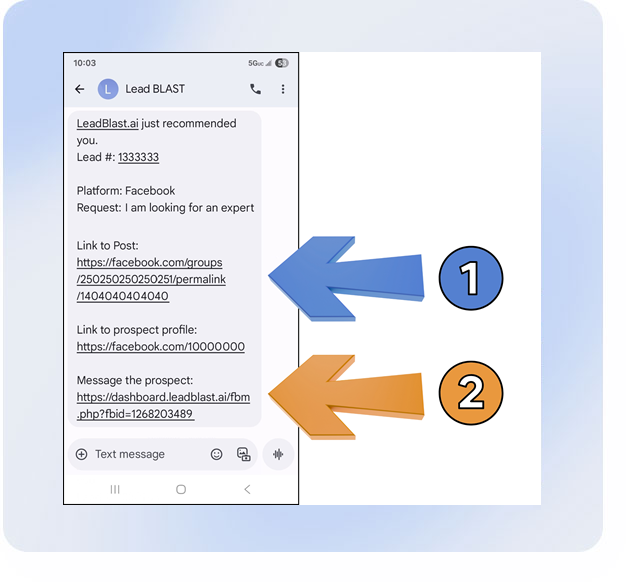
- You do, however, have the ability to go beyond LeadBlast’s recommendations by utilizing Link 1 and Link 2 from the LeadBlast notifications that you receive (see left picture + explanations below).
Link 1 – Link to Post
LeadBlast.ai has recommended you. By clicking on that link in the notification that you received, you can go to that particular post to see the recommendation of you. With this available resource, you have the ability to use LeadBlast’s recommendation as a springboard for additional layers of comments. Examples:
- ►You can respond to the recommendation of you with a thank you and add your own comment to the prospect.
Example: “Thank you for recommending me. I provide **** services and would love to help you out. Feel free to reach out to me at ***** with any questions.”
You can also add your own selling points in this comment, like photos of your portfolio, your website/social media, your value/unique selling proposition, etc. - ►You can ask other people that you know to go into that post and also recommend you. The notification of your recommendation enables you to amplify and add recommendations from other people.
Not a member of the group where the post appears?
That’s okay. Join the group. If you get accepted into the group quickly enough after you’ve been recommended, you can then respond on the post as mentioned above. If your joining the group comes days after that particular recommendation, you’ll at least be in that group and next time you get recommended in this group you’ll already be there.
Link 2 – Message the prospect
This option is only available for Facebook recommendations.
Clicking on this link, enables you to send a direct message to the prospect through the Facebook Messenger app. You can use this function to add another foot in the door by messaging the prospect with something like:
“Hi – I heard you were looking for **** services and I would love to help you out. Feel free to reach out to me at ***** with any questions.”
You should only message the prospect on leads that seem highly relevant and worthwhile for you. Messaging each prospect on every recommendation might result in people getting annoyed.
App
If you haven’t already, make sure to download our mobile app (LEADBLAST is its name), available for Apple and Android phones. It will provide you with access to all of your profile settings there. Additionally, the app provides you with a complete dashboard with all your leads that you can track and manage. We also sometimes send you push notifications to the app, so it’s a great tool to have.